How we decide when to alert you
WebsitePulse.io does not alert you the moment something looks wrong. Each check is called a pulse, and you can choose how many consecutive failed pulses trigger a notification.
Alert sensitivity
When WebsitePulse.io detects that your site is unavailable, it waits to confirm the problem across multiple pulses before sending a notification.
This is deliberate. Brief blips (a server hiccup, a momentary network issue, a slow response that resolves itself) are common and almost never require action. Alerting on every single one would flood your inbox with false alarms and train you to ignore notifications, which defeats the purpose.
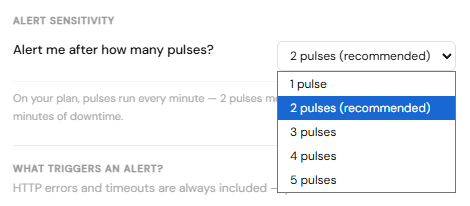
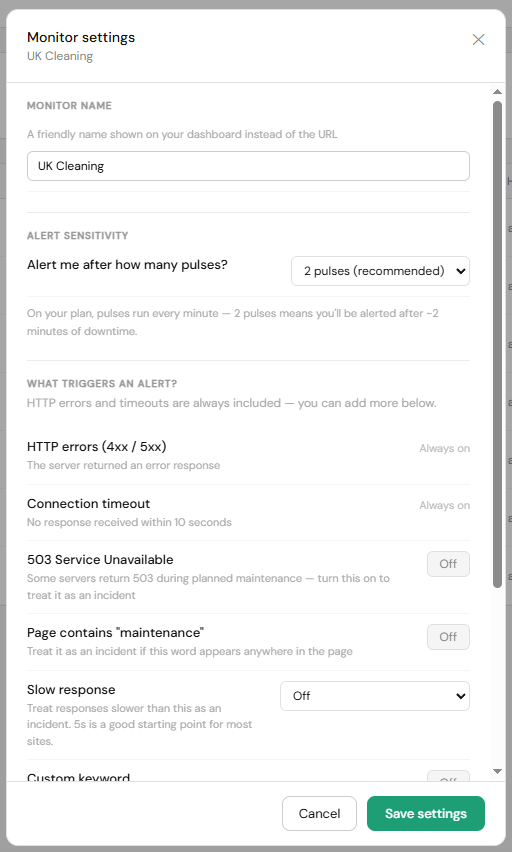
You can set your alert sensitivity in Monitor settings under Alert sensitivity. Choose from 1 to 5 pulses:
- 1 pulse: alert on the first failed check (most sensitive)
- 2 pulses: alert after 2 consecutive failures (recommended)
- 3 to 5 pulses: useful for sites with occasional blips
The settings panel shows you exactly what your chosen number of pulses means in real time, including how long that delay is on your current plan.
Alerts per incident
An incident begins when your site goes down and ends when it comes back up. By default, we send one alert when an incident starts and one when it recovers. This is usually all you need. If your site is down, you already know, and a second alert while it is still down rarely helps.
If you'd prefer more contact during a long outage, you can increase this in Account settings under Notification limits. Options are 1, 3, 5, or unlimited. With unlimited selected, we'll re-alert you each time the pulse threshold is met again during the same incident.
Recovery notification
Whenever a monitor that has been down comes back up, you will always receive a recovery notification regardless of your alerts-per-incident setting. Recovery resets the incident counter, so the next outage starts fresh.